Player Turns
Player turns are done in Player Turn Order. A turn consists of any number of Free Actions before and/or after either two Standard Actions, one Standard Action then Idling, or just Idling. Once a player Idles, they cannot perform any more Standard Actions this Season. Once all players Idle, the Season moves to its Battle Phase.
Summary of Available Actions
Standard Actions, 2 (if possible) during the player’s turn:
- Assign Workers to a Workplace or to refine Resources.
- Build a Workplace.
- Commission, to unlock a resource conversion path for the Season.
- Deploy a
Knight
 on the map or another player’s
Castle.
on the map or another player’s
Castle. - Attempt to Enact a Law card, triggering a vote.
- Have a
Knight
Flee from a Tile.
Free Actions, at any time (including during another player’s turn):
- Guarantee something, by making a binding promise.
- Haggle with other players.
If fewer than 2 Standard Actions were performed:
- Idle for the rest of the Season.
Player Turn Order and Tie Breaker
The same tracker handles Player Turn Order and ties.
The does not move. This board is split into two halves. At any point, one half is the Action Phase half, and the other is where the Idling players go to.
The player turn order is read in clockwise order, starting from the Action Phase half. The right side starts at the , the left side ends at the .
When they start to Idle, players move their
Player Cube  to the next available spot of the other half (again, in clockwise order).
Ties are broken by player turn order. Being earlier in the player turn order means winning the tie. Idling players are considered as going after non-Idling players.
In effect non-Idling players win ties during the Action Phase, but those who Idled sooner win ties during the Battle Phase (and the next Action Phase).
Example
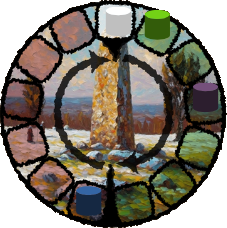 In this example, the turn order is
Bandits
In this example, the turn order is
Bandits  , Green Player,
then Purple Player. Blue Player already passed.
The priorities are:
Bandits
, Green Player, Purple Player,
then Blue Player.
, Green Player,
then Purple Player. Blue Player already passed.
The priorities are:
Bandits
, Green Player, Purple Player,
then Blue Player.
Now, Green Player passes:
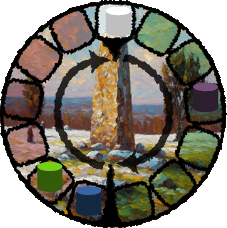 The turn order is now
Bandits
then Purple Player.
Blue Player and Green Player already passed.
The priorities are:
Bandits
, Purple Player, Blue Player, then
Green Player.
The turn order is now
Bandits
then Purple Player.
Blue Player and Green Player already passed.
The priorities are:
Bandits
, Purple Player, Blue Player, then
Green Player.
Now, the last player passes:
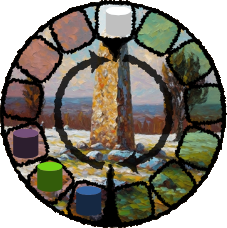 This caused the Action Phase to end, so the Action Phase half of the board
changed.
The turn order is now Blue Player, Green Player, Purple Player, then
Bandits
.
The priorities are the same as the turn order.
This caused the Action Phase to end, so the Action Phase half of the board
changed.
The turn order is now Blue Player, Green Player, Purple Player, then
Bandits
.
The priorities are the same as the turn order.
Standard Actions
Assign
The player assigns Workers to a built Workplace. The Workers are moved from the Unemployed reserve to the associated Faction’s Employed reserve.
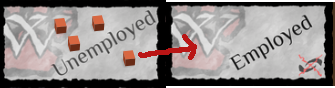
In order to use Workers of a Faction, the player must be in Control of at least 1 Tile of that Faction (see _Tile Control). Note: Bandit Tiles are valid Faction Tiles.
For each Worker newly assigned, the player gains 1
Influence  .
.
The player can target any built Workplace, as long as no player currently uses
it and the player Controlling the associated Castle permits it (see
Tile Control). To denote who
currently uses the Workplace, place a
Player Cube
on it.
Each Workplace indicates the types of Workers it requires. All required Workers must be provided at once in order to assign.
Build
The player builds a Workplace from their Hand, paying the associated Resource cost. Each player may own a maximum of 9 built Workplaces, organized in a 3x3 grid. If that limit has already been reached, they may discard one of their built Workplaces to make room (as part of the build action), if no Workers are assigned to it. All Resources on the Workplace are discarded.
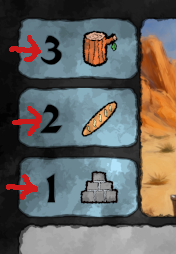 In this example, the build cost is 3 Logs, 2 Baguettes, and 1 Brick.
Control of the Castle is not required. Players cannot build on another’s player land.
Workplaces can only moved during the Cleanup phase of the Season, not during player turns.
Instead of a Workplace from their Hand, players may build the Sovereign Workplace (Coronation Ceremony), following the same rules. Note however that, unlike all other Workplaces, this card will be automatically discarded during the Cleanup phase of the Season.
Commission
The player commissions a Worker to enable one of the Resource Board’s
conversion paths.
That worker is moved from the Unemployed reserve to the associated Faction’s
Employed reserve.
A
Player Cube
is placed on the conversion path’s Worker
symbol to show it has been unlocked.
For the rest of the Season, the player can use that conversion path as a Free Action. Conversion follows the recipe indicated on the Resources Board. The cost is always X of Resource A + X of Resource B to generate X of Resource C.
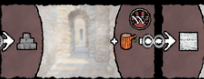 In this example,
a
Wolf Tribe
In this example,
a
Wolf Tribe  Worker can be commissioned to convert
X Bricks + X Logs into X Marble.
Worker can be commissioned to convert
X Bricks + X Logs into X Marble.
Control of the Castle is not required, but only the Resources Board owner
may perform the action, and no
Influence
is generated by
employing that Worker.
Deploy
The player deploys one of the
Knights
they own from
their Castle to either a Tile or another player’s Castle.
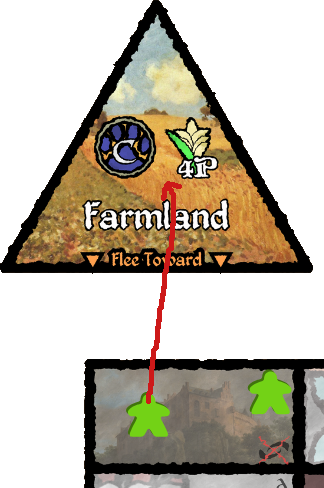
Enact
The player attempts to enact a Law card among those currently available in the Law deck. This requires the player to at least commit the amount of Influence threshold of the law in favor.
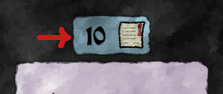
This triggers a vote. In reverse Player Turn Order, each player may spend
Influence
to either accept or refuse the law. The current player
thus gets 2 chances to vote.
After the last player is done spending
Influence
, remove
the amount of
Influence
against the law from the amount
of
Influence
in favor.
If the resulting amount if at least equal to the Law card’s Threshold, the
Law is enacted. Otherwise, the Law remains available. In either case,
all spent
Influence
is discarded.
Players who cast a vote in the way that won earn 2
Prestige  .
.
Failing to enact the Law following the vote still counts as a Standard Action.
Flee
The player spends one
Influence
to moves one of their
deployed
Knights
by following the Flee direction of
that Tile. This cannot be used on a
Knight
currently
placed on Capital or in a Castle.
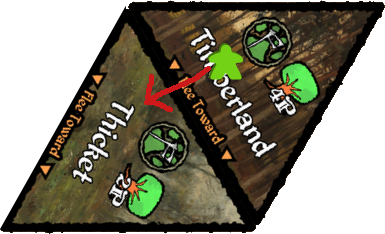
Free Actions
Players may, at any time (even during other players’ turns), take any of the following Free Actions.
Guarantee
The player makes a binding promise. It may be joint with other players. Failure
to follow through incurs a 20
Prestige
penalty (noted by
the crossed-out
Prestige
reserve,
Oathbreak 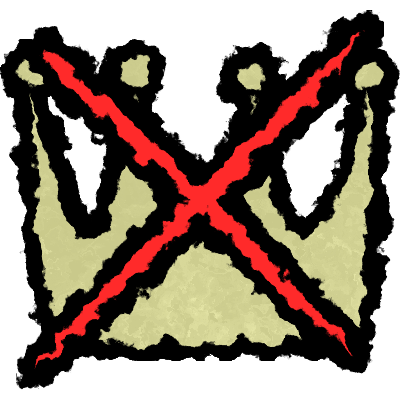 ). The promise is agreed on, then written down and
signed by the players’ color name (e.g. Lord Blue, Lady Green). The letter of
the promise - and not its spirit - determine whether it is broken or not. Only
the parties failing to follow through on their promise are penalized.
). The promise is agreed on, then written down and
signed by the players’ color name (e.g. Lord Blue, Lady Green). The letter of
the promise - and not its spirit - determine whether it is broken or not. Only
the parties failing to follow through on their promise are penalized.
If an
Oathbreak
occurs, the promise is voided. Cross it out.
It is recommended to be very precise when making a promise, for example by starting with “If possible”, in order to avoid getting trapped.
If some players do not agree that an
Oathbreak
occurred, all
players vote (with “yay” and “nay”, not
Influence
) to decide.
Purposefully trapping another player and/or causing an
Oathbreak
is absolutely permitted. You are among scoundrels, after all.
Haggle
The player trades with other players. A trade may involve Workplaces
held in Hand, Resources (excluding
Card Resources  ,
Influence
,
Prestige
,
or
Oathbreak
, as denoted by
Not Tradable
,
Influence
,
Prestige
,
or
Oathbreak
, as denoted by
Not Tradable  ),
Unemployed Workers, as well as markers (no gameplay effect, but can be made
meaningful through promises - e.g. as a currency).
),
Unemployed Workers, as well as markers (no gameplay effect, but can be made
meaningful through promises - e.g. as a currency).
Idling
Instead of a Standard Action, players may start Idling. They move their
Player Cubes
to the next turn tracker’s highest available
spot (
spot excluded). The player cannot do any
more Standard Actions this Season.